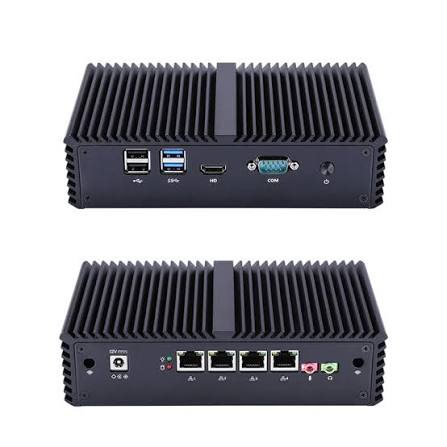
Nothing ruins a quiet home office or living room faster than a server whirring away in the background 24/7. A well-planned fanless home server build eliminates that noise entirely, using passive cooling and low-power components to run reliably without a single moving part.
Why Go Fanless?
Traditional servers rely on fans to move air across hot components, which inevitably means noise — and moving parts that eventually wear out and fail. A fanless build instead uses large heatsinks, careful component selection, and case designs that dissipate heat passively through the chassis itself, resulting in a completely silent machine that also tends to be more reliable long-term since there’s nothing mechanical to break.
Choosing the Right CPU
The single most important decision in a fanless build is the processor. Look for CPUs with a low TDP (Thermal Design Power) rating — generally under 15 watts for genuinely passive cooling to work well. Intel’s low-power N-series chips and AMD’s embedded Ryzen options are popular choices, offering enough performance for typical homelab workloads like Pi-hole, a lightweight Kubernetes node, or a handful of Docker containers without generating excessive heat.
Selecting a Fanless Case
Purpose-built fanless cases use the entire chassis as a heatsink, with the CPU connected via a thermal interface directly to the case walls, which then radiate heat into the surrounding air. Brands like Akasa and Streacom specialize in these enclosures, designed specifically around common mini-ITX motherboards and low-power CPUs.
Storage Considerations
Traditional spinning hard drives generate some noise and heat of their own, working against the goal of a silent build. For a true fanless setup:
- SSDs – no moving parts, silent, and increasingly affordable for reasonable capacities
- NVMe drives – even faster than SATA SSDs, though they can run hotter under sustained load, so check thermal specs carefully in a passively cooled case
- Avoid spinning HDDs – if you need bulk storage, consider a separate NAS device rather than cramming HDDs into your fanless build
Power Supply Choices
Standard PC power supplies almost always include a fan. For a truly silent build, look for fanless PSUs or external DC power adapters (common in mini-ITX fanless cases), which convert AC power externally and feed clean, quiet DC power directly into the motherboard.
Software Considerations for Low-Power Hardware
Once assembled, choose a lightweight OS and avoid workloads that push the CPU into sustained high-load states for long periods, since passive cooling has less thermal headroom than active fan cooling for handling sudden performance spikes. Good workload fits include:
- Pi-hole or AdGuard Home for DNS-level ad blocking
- A lightweight reverse proxy like Nginx Proxy Manager
- Home Assistant for smart home automation
- Small-scale Docker container hosting
Heavier workloads like Plex transcoding multiple simultaneous streams or running several resource-hungry VMs may cause thermal throttling on a fully passive build, so match your workload expectations to the hardware’s realistic thermal ceiling.
Monitoring Temperatures
Even in a well-designed fanless build, it’s worth monitoring CPU temperatures under load using tools like lm-sensors on Linux to confirm the passive cooling is keeping pace with your actual workload, especially during the first few weeks of operation.
Final Thoughts
A thoughtfully planned fanless home server build delivers a really silent, reliable addition to your homelab, ideal for always-on lightweight services like DNS filtering, home automation, or a small container host. By carefully matching CPU, case, and storage choices to your actual workload needs, you get 24/7 reliability without ever hearing a fan spin.
Leave a Reply